
One Equals Sign Too Many: Java4Shell Explained
A malformed Base64 string can corrupt memory inside a Java server. What Java4Shell (CVE-2026-114938) is, who is really exposed, and how to check your own systems in a few minutes.
A malformed Base64 string can corrupt memory inside a Java server and, in some popular products, give an attacker code execution without logging in. Java4Shell (CVE-2026-114938), found and disclosed by Calif, is a bug in the fast Base64 decoder that OpenJDK uses on newer Intel and AMD processors. Oracle and OpenJDK released fixes on November 17, 2026.
The headline makes it sound like every Java server is exposed. Far fewer are, because three things have to line up: the JDK build, the processor and the application. This post explains what the bug is, who is really exposed, and how to check your own systems in a few minutes.
The short version
Base64 is how computers turn binary data, such as a key or an image, into plain text so it can travel inside headers, tokens and web forms. The equals signs at the end of a Base64 string are padding, a bit like packing peanuts in a box.
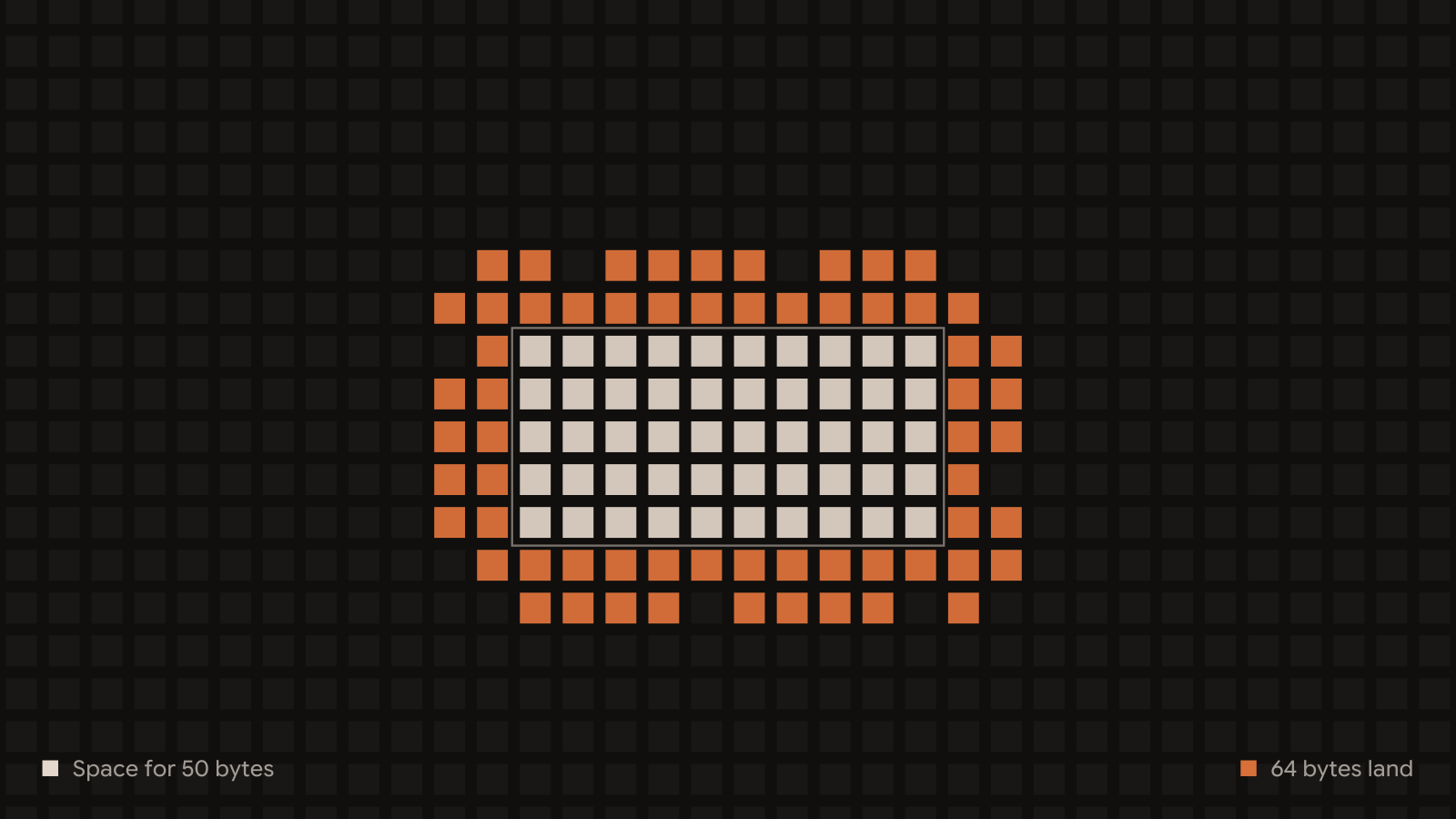
Picture a delivery driver who is told how many boxes to drop off. For a few unusual endings, the fast decoder counts the padding wrong and comes up with minus one. The van's automatic unloader reads minus one as "unload everything", so 64 bytes land in a space sized for 50 and spill into whatever sits next to it in memory. Java checks the paperwork afterwards and rejects the string, but by then the spill has already happened.
Step 1 of 5Java sets aside space for 50 bytes of output.
An attacker who controls what sits next door, and what spills into it, can turn that spill into a memory leak and then into code execution.
Impact
Where all the conditions line up, an attacker can go from one crafted request to running code inside the Java process:
- They send Base64 the application will decode, for example in a login header, a token, a SAML response or an upload.
- The fast decoder writes past the end of its buffer and corrupts a neighbouring object on the heap.
- With careful shaping, that corruption lets them read memory they shouldn't. Calif calls this stage JavaBleed. It can expose session tokens, private keys, passwords and personal data held in the process.
- Using what they read, they repair the damage and escalate to writing anywhere in memory, and from there to running their own code as the Java process.
In default configurations, Calif's researchers reached code execution without authentication in Keycloak, Jira, Confluence, JFrog Artifactory, Jenkins and PingFederate. They needed a login first for Kafka, Solr, Elasticsearch, Gerrit and Spinnaker. A Java client that opens a TLS connection to a malicious server can also be attacked.
Several of those products sit at the center of a company. Keycloak and PingFederate hand out logins for everything else. Jenkins and Artifactory hold build credentials and decide what code ships. Code execution on any of them opens a path to much more than the server itself.
| Product | Access needed in Calif's tests |
|---|---|
| Keycloak | None |
| Atlassian Jira | None |
| Atlassian Confluence | None |
| JFrog Artifactory | None |
| Jenkins | None |
| PingFederate | None |
| Apache Kafka, Apache Solr, Elasticsearch, Gerrit, Spinnaker | A login |
There's no single exploit that works everywhere. Each target needs its own recipe for arranging memory, and a failed attempt usually crashes the process. That raises the bar, but it doesn't remove the risk for a high-value target someone is willing to spend time on.
Who is really exposed
A server is exposed only when all three of these are true:
| Condition | How to check |
|---|---|
| An affected JDK build (17.0.6 or later, 21, 25, 27, or Oracle 8 Performance Pack) without the November fix | jcmd <pid> VM.version on each running Java process |
| An x86-64 processor with AVX-512 VBMI | The /proc/cpuinfo check under What to do now |
| The application decodes Base64 from outside input | Login headers, tokens, SAML, uploads or messages |
The processor matters
The vulnerable decoder only runs on x86-64 processors with a feature called AVX-512 VBMI. That rules out a large share of servers, and it means exposure depends on the hardware a workload lands on, not only on the image it runs.
| Platform | Exposed? |
|---|---|
| ARM64 (AWS Graviton, Ampere, Apple silicon) | No |
| Intel Skylake and Cascade Lake (AWS m5, c5, r5) | No They have AVX-512 but not VBMI |
| Intel Ice Lake and newer (AWS m6i, c6i, r6i, m7i, c7i) | Yes |
| AMD Zen 3 and older (AWS m5a, m6a, c6a) | No They have no AVX-512 |
| AMD Zen 4 and newer (AWS m7a, c7a, r7a) | Yes |
Containers use whatever processor their host has. The same image can be safe on an older instance type and exposed after autoscaling moves it to a newer one. Check the hosts, not only the image.
Affected JDK versions
| JDK line | Affected | Fixed (Oracle builds) |
|---|---|---|
| 8 and 11 | Not affected | None needed |
| 8 Enterprise Performance Pack | 8u511b33-perf | 8u513-perf |
| 17 | 17.0.6 and later | 17.0.21.1 (Corretto: 17.0.21.1.2) |
| 21 | Builds before the fix | 21.0.13.1 |
| 25 | Builds before the fix | 25.0.5.1 |
| 27 | Builds before the fix | 27.0.1.1 |
| Temurin, Zulu, Microsoft, Red Hat, SapMachine, Liberica and others | Same lines as above | Check your vendor's advisory |
Many products ship their own Java runtime. Jira, Confluence and other on-prem packages often bundle one, and container images carry their own. Updating the system JDK doesn't fix those, so update the product or rebuild the image as well.
Technical analysis
Since JDK 17.0.6, HotSpot can replace the Java Base64 decoder with a hand-written routine that uses AVX-512 VBMI instructions to decode 64 bytes at a time. HotSpot only switches to it after the decoder has run often enough to be compiled by the C2 optimizing compiler, which on a busy server happens quickly.
At the end of the input, the routine works out how many output bytes are left and builds a mask that tells the processor which bytes to write. For certain padding endings, such as =, == and XY=, that count underflows to minus one or minus two. A negative count turns the mask into all ones, which tells the processor to write all 64 bytes.
In Calif's example, 64 letters followed by one = makes Java allocate a 50-byte output array. The routine then writes 64 bytes starting at offset 48, overflowing the array by 62 bytes. Java's own checks reject the input afterwards with an IllegalArgumentException, which is why ordinary testing never noticed anything wrong.
From overflow to code execution
- Warm up the decoder with valid input until C2 compiles the fast path.
- Arrange the heap so a byte array the attacker can later use sits right after the decoder's output buffer. Over the network this is done by sending a request in carefully timed pieces.
- Send the malformed ending, so the overflow enlarges that neighbouring array's length field.
- Use the enlarged array to change the length of a second array, then read far past its end to leak memory.
- Use the leaked addresses to repair corrupted objects and build a write primitive, then hijack execution.
Calif says it found the bug in about an hour with an AI coding assistant and had the first exploit two hours later. Full exploit chains for specific products are being held back for now, but the root cause and a trigger are public.
Reproducing it in our lab
To see it for ourselves, we ran a small test on a lab machine with an Intel Xeon processor that has AVX-512 VBMI, running OpenJDK 21.0.12.1 from Ubuntu 24.04, a build from before the fix. The test warms up the decoder with valid Base64, then decodes 64 slashes followed by one equals sign into a 50-byte buffer. It watches a 32-byte array that Java placed right after that buffer in memory.
On the very first malformed decode, the neighbouring array's length changed from 32 to -1,700,370,022. Java still threw its normal IllegalArgumentException, so from the application's side the input looked rejected and nothing seemed wrong. With the workaround flag -XX:-UseBASE64Intrinsics, 1,000 malformed decodes left the neighbour untouched.
Fast decoder on
OpenJDK 21.0.12.1, before the fix
Java threw its normal IllegalArgumentException. From the application's side, nothing seemed wrong.
Fast decoder off
-XX:-UseBASE64Intrinsics
1,000 malformed decodes left the neighbour untouched.
Overwriting an array's length field is the first step of the exploit chain described above. Our test stops there. It doesn't leak memory or run any code.
The fix
The patched builds correct how the routine handles padding, so the output count can't go negative and the write stays inside the buffer.
What to do now
Check the processor
On each Linux host, look for the four processor flags the vulnerable decoder needs. If any is missing, the host isn't exposed to this bug:
grep -m1 '^flags' /proc/cpuinfo | tr ' ' '\n' | grep -E '^(avx512f|avx512bw|avx512vbmi|bmi2)$'
Check the Java runtimes that are actually running
java -version only shows the runtime on your PATH. Check each running process instead:
jcmd -l
jcmd <pid> VM.version
For containers:
docker exec <container> java -version
Patch and restart
Move to a fixed build from your JDK vendor (see the table above), then restart every Java process, since a running JVM keeps the old code. Update products that bundle their own runtime, and rebuild container images on a fixed base.
If you can't patch yet
Turn off the fast Base64 decoder. Base64-heavy services will decode more slowly, and the change needs a restart:
JAVA_TOOL_OPTIONS="-XX:-UseBASE64Intrinsics"
Confirm it took effect on the running process:
jcmd <pid> VM.flags | grep -i base64
Another option is -XX:UseAVX=2, which switches off all AVX-512 code in the JVM. Use it only on x86-64 hosts, because a JVM on ARM won't start with it. A reverse proxy in front of the application isn't a reliable fix, because some exploit chains fit in one ordinary request.
Look for failed attempts
Failed attempts usually crash the JVM, which writes an hs_err_pid crash log. Look for recent ones, and for containers that exited with code 134 or 139:
find / -name 'hs_err_pid*.log' -newermt '2026-11-01' 2>/dev/null
A crash with no deploy or load change behind it, on an exposed host, is worth investigating.
Our take
Java4Shell is serious, but it's narrower than the name suggests. It takes a specific JDK, a specific class of processor and an application that decodes attacker input on a hot path, plus a recipe for that application. Where those line up, the targets are some of the most valuable systems in a company: the identity provider, the CI server and the ticketing system.
The most useful thing to do this week is to build that list: which hosts run an affected JDK on an AVX-512 VBMI processor, and which of them expose Base64 decoding before login. The host checks above take a few minutes per server.
Could Java4Shell affect your environment?
We currently assist our customers identify internet-facing applications that may be vulnerable to Java4Shell. Peter, our autonomous AI hacker, looks at how each app works to identify where untrusted input could reach the vulnerable decoder.
Talk to us about Java4ShellReferences
- Calif: Java4Shell, the original disclosure
- OpenJDK Vulnerability Group advisory, November 17, 2026
- Oracle Critical Security Patch Update, November 2026
- JDK-8296887: Base64 encoding optimization for x86 using AVX-512
Figures 1 and 2 are illustrations of the mechanism described in the text, not a trace of a real exploit. Figure 3 is a simple model of the three conditions. Figure 4 replays the numbers from our lab test, and Figure 5 is a recording of that test.